Features

Plugin offers great amount of features and customitibility

Modern Design

Create walls or free style layouts for any website. Customize thumbnail layout with your own CSS.

Multimedia gallery

Support for HTML5 videos, audio, images plus Youtube and Vimeo playback.

Retina ready

Scalable vector icons that look perfect on any device.

Cross browser support

Compatible with all major desktop browsers and mobile browsers like IOS and Android.

Grid and Masonry layouts

Support for responsive grids with Masonry and animation effects.

Lighbox feature

Open images and videos in full lighbox mode and connect them into galleries.                 

Lazy load

Lazy load images to improve page loading speeds. Automatic placeholder sizes based on image size.

Grid types

Different grid types available including masonry, justified and default grid with responsive breakpoints.

Automatic playback

Autoplay videos automatically in the page. Play one by one in order, random order or play all videos at once.

Mixed content

Mix both audio and video content inside one gallery.

Image categories

Assing categories to images and divide gallery into multiple category.

Shortcodes in description

Support for shortcodes in title and description.

Install in minutes

Very easy to include gallery in your project.

Easily Customised

Clean and simple code, easy to customize, remove or add features of your own.

Parameters

Customize plugin with settings like volume, controls, icons, responsive breakpoints.

Pagination

Create grid pagination and limit content per page.

Filter images

Live filter images per keywords.

Full source code included

Our plugins have full source code included, so developers can modify and extend the code even further and have full potential of each product.

Constant development and updates

Once purchased, gallery comes with access to support and free updates.

More examples

demo
demo
demo

Skin pure

Plugin supports multiple skins to choose from. Title and descrition can be placed over images, below images or right of images. Suitable for widgets and narrow layout spaces in web page.

Youtube and Vimeo videos support

Plugin support not only HTML5 videos but also Youtube and Vimeo. ALl oyu need to do is provide Youtube and Vimeo video ID and it will play on hover. No api keys are required.

Animation effects

Plugin comes with many predefined CSS animations, offering wide variety of rollover styles to choose from. Each style can be modified using simple CSS.

Autoplay mode

Videos can autoplay on page load in several different modes, inluding play one by one video in order, play random order or play all vidoes at once.

Video preview

Display progress thumbnail above video and allow quick seek preview through the video.
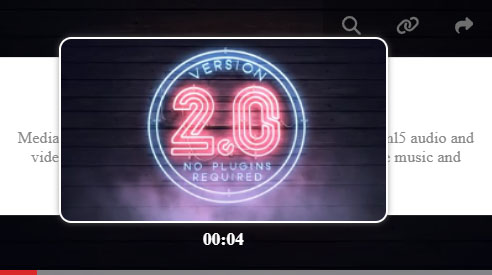
preview-seekbar

Quick expand mode

Enable click on video to toggle quick fullscreen mode for easier viewing.

preview-seekbar

Masonry layout

Plugin supports multiple grid types, including masonry and justify alongside standard grid layout. Create Masonry layout which optimizes the use of space inside the web page by reducing any unnecessary gaps.

masonry

Categories and search filtering

Create multiple image categories with their descriptions, and allow the user to click through different categories and show the relevant images in your gallery. This layout is using justify to layout images in rows.

masonry

Pagination

Create pagination and display groups of images per page. Choose how many items to show per page. Pagnation buttons will be created below the gallery.

pagination

Load more

If you have lots of images in the gallery, use load more option to save bandwidth and improve load speed. This will create load more button below the gallery. Load more can also be triggered by user scrolling to page bottom.

Load more on demand

Play video in tooltip

Option to play video in a tooltip (instead of inline) ads more compatiblity for this plugin. Tooltip works on all platforms (desktop and mobile browsers). Using video in a tooltip does not interfere with layout on your website.

Show subtitles over video

Display subtitles over video area. Subtitles are available for self hosted video, Youtube, Vimeo and audio. Supported formats for subtitles are vtt or srt.

Carousel

Create image carousel which gaves focus to main image. Optional carousel autoplay slideshow with timer.

Variable width carousel

Support for carousel with variable width images.

Testimonials

  • "Runs very smoothly in my website without problems."

    John K.
  • "Very good plugin that was perfect for my project. Highly customizable!"

    Freemedia Design
  • "I was looking for video hover plugin and this totally rocks! Customer support is fast and responsive. Updates keep coming too!"

    Susan M.

30-day money-back guarantee. Full refund if we can't fix your issue.

Questions

What happens when a yearly license expires?

Your plugins keep working on your site, nothing breaks for your visitors. An active license is needed for plugin updates, new features and support, so renewing keeps you up to date.

What does the lifetime license include?

A one-time payment with no renewals. You get lifetime updates and support for all websites in your plan.

Can I add more websites later?

Yes. You can upgrade from your account dashboard at any time and buy addional licenses for any number of websites.

Can I get a refund?

Yes. If within 30 days of purchase you run into an issue that makes the plugin unusable and our support can't resolve the problem, you get a full refund. Most issues are solved quickly, so contact support first.

How do I activate plugin?

After checkout you get access to your Account dashboard where you can download plugin, documentation and manage all your licenses. Install the plugin in your WordPress admin, enter the registration token which you get in Account dashboard, and you are done.